Kodak & Sawyer Carousel Organizing Movie

Watch how to load and orient your slides correctly in Kodak and Sawyer carousels before scanning. Start at slot #1, move clockwise, and keep the logo side facing the right direction.

If the video does not play, download the movie here.

Quick Orientation Tips

The slides go in upside down and the backs should face you when placed in the carousel. Start at the #1 slot and go clockwise. The #1 slide’s face points toward the back of the last slot (#80 or #140), and the face usually shows the frame’s logo.

Start Your Order

Our Result — Premium Editing Included

Our premium scan result: clean detail, accurate color, and balanced contrast.
Premium Editing Included
Old-Photo — a division of Affordable Scanning Services LLC

Typical Big-Box Result — You Decide

Typical low-quality competitor scan: muddy color, low contrast, visible defects.
Typical Big-Box Result
(Yes. This is what we got from them in a test project.)

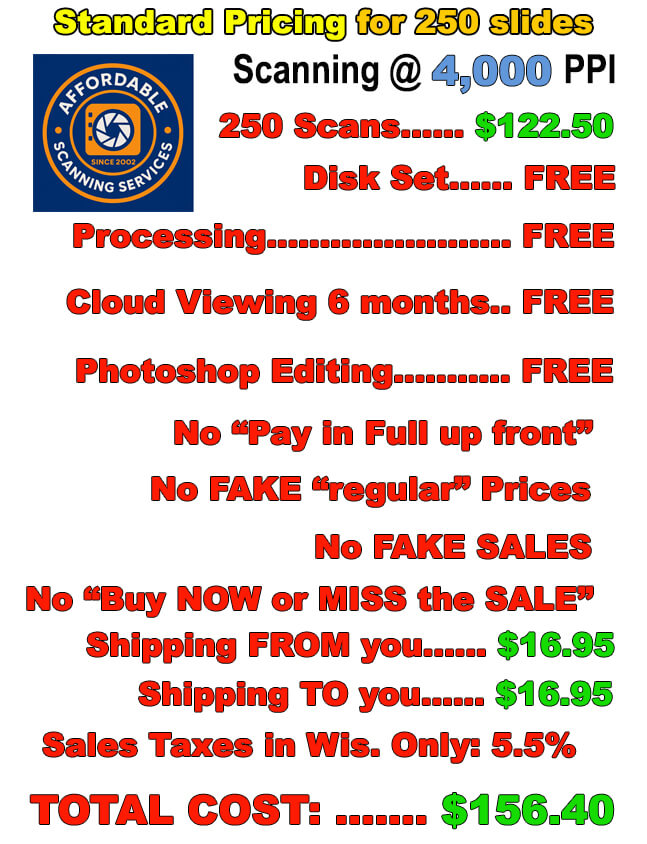
Our Pricing — Affordable Scanning

Affordable Scanning Services pricing for 250 slides
Our Pricing: Affordable Scanning — 250 slides

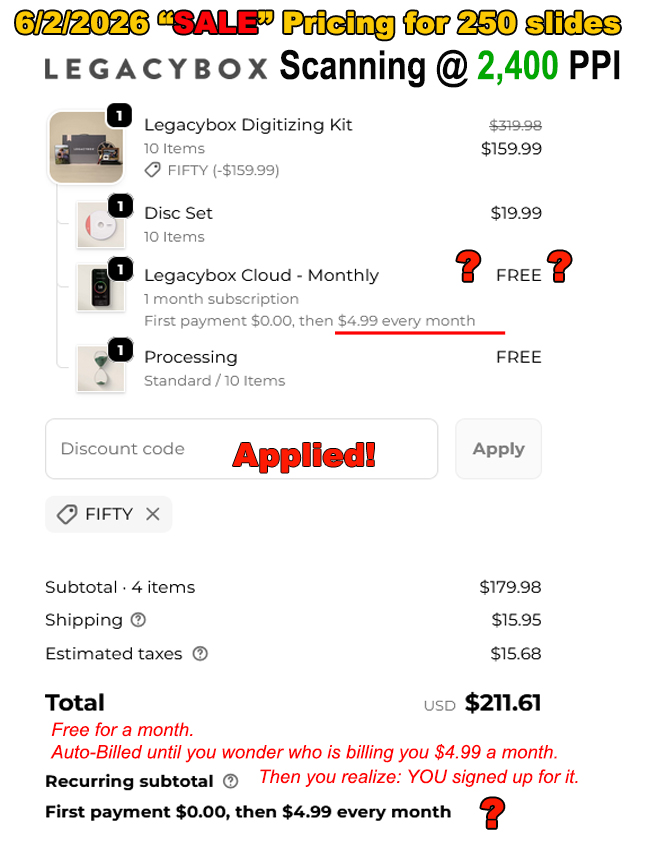
Legacy Box Pricing — You Decide

Legacy Box pricing comparison for 250 slides
Legacy Box Pricing: Same 250 slides — you decide